Customer testimonials are one of the most powerful trust-building tools for any website. But here’s the catch: even the most glowing reviews can lose impact if they’re hidden in plain text or poorly formatted. That’s where testimonial templates come in. With the right design, layout, and placement, testimonials instantly grab attention, highlight credibility, and influence buying decisions. In this guide, we’ll explore the best testimonial design templates, showcase creative examples, and even point you to some free testimonial templates you can use right away.
What Are Testimonial Templates?
A testimonial template is a pre-designed layout that helps you showcase customer reviews, feedback, and success stories in a professional way. Instead of starting from scratch, businesses can plug in client quotes, ratings, or case study snippets into ready-made designs that look polished and trustworthy.
Good testimonial design templates balance text, visuals, and brand identity so testimonials don’t just sit quietly—they persuade. For example:
- A clean card-style template makes short reviews stand out on product pages.
- A carousel testimonial template works well on homepages where space is limited.
- A video testimonial layout builds emotional connection for service-driven industries.
Whether you’re looking for creative testimonial templates to impress or free testimonial templates to save time, the goal remains the same: transform customer voices into visual proof that converts.
Types of Testimonial Templates & Best Design Examples
Not all testimonials work the same way. A one-line review on a product page needs a different design than a detailed client story on a service website. Below are some of the most popular testimonial template designs with examples of where they shine.
1. Card-Style Testimonial Templates
Card layouts are one of the most common testimonial design templates. They display reviews in neatly framed boxes—often with the customer’s name, photo, star rating, and a short quote.
Best use case: Product pages, SaaS websites, or anywhere you want multiple testimonials displayed side by side.
Creative tip: Add brand colors or subtle icons to make them feel unique.
2. Grid or Masonry Testimonial Layouts
Instead of cards in a row, grid-style testimonial templates let you showcase several customer stories at once in a more dynamic arrangement.
Best use case: Agency portfolios, B2B landing pages, or sections where social proof needs to look visually rich.
Creative twist: Mix short quotes with longer ones, and add customer photos for credibility.
3. Carousel / Slider Testimonial Templates
Carousels are interactive testimonial templates where reviews slide automatically or by user click. They save space while still allowing multiple testimonials.
Best use case: Homepage hero sections, banners, or mobile-friendly websites.
Creative advantage: Pair customer testimonials with brand logos or star ratings for instant recognition.
4. Video Testimonial Templates
Text is good, but nothing beats hearing real customers speak about their experience. Video testimonial design templates embed customer stories into stylish frames that fit seamlessly into websites.
Best use case: Service businesses, eCommerce, online courses, or healthcare brands that want emotional connection.
Creative idea: Add captions and highlight key quotes in bold text alongside the video.
5. Quote-Based Minimalist Templates
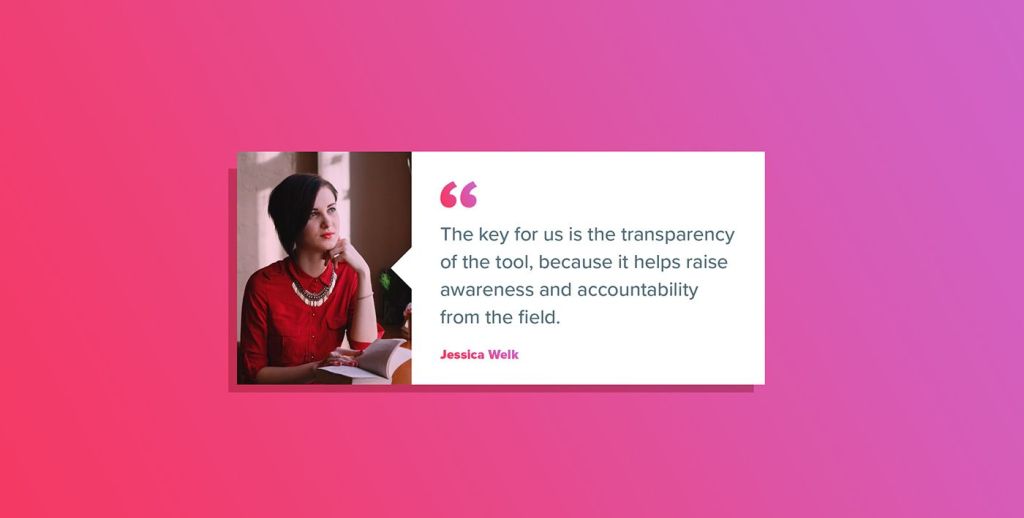
Sometimes, less is more. Minimal testimonial templates highlight a single, powerful customer statement in large typography.
Best use case: Landing pages, checkout pages, or high-impact campaign sites where one strong review can tip the decision.
Creative option: Use gradient backgrounds or branded color blocks to keep them from looking too plain.
6. Free Testimonial Templates (Quick Start)
For brands on a budget, there are plenty of free testimonial templates available online. Many website builders like WordPress, Wix, and Shopify include pre-designed testimonial sections that can be customized easily.
Best use case: Small businesses, start-ups, or anyone needing quick plug-and-play layouts.
Pro tip: Even with free templates, tweak fonts, colours, and spacing so the testimonials feel like a natural part of your brand.
Why Great Testimonial Design Matters (Impact on Conversions & Trust)
A testimonial isn’t just “nice words” about your brand—it’s social proof in action. But here’s the catch: badly designed testimonial sections can actually weaken credibility. Imagine reading a five-star review buried in small gray text at the bottom of a page—you’d probably miss it, right? That’s why thoughtful testimonial design templates make all the difference.
1. Builds Instant Trust
Studies show that 92% of consumers trust user-generated content over brand messaging. A strong testimonial layout with clear customer names, photos, and authentic quotes signals that your business delivers real results.
2. Pushes Buying Decisions Faster
Good testimonial templates strategically place reviews near CTAs (like “Buy Now” or “Sign Up”). This nudges hesitant buyers, helping them make decisions with confidence.
3. Enhances Website Aesthetics
Beautifully designed testimonials aren’t just functional—they also make your site look polished and modern. Whether you’re using creative testimonial templates with visuals or minimal layouts, they add balance and flow to your web design.
4. Supports SEO & Engagement
When you use structured testimonial templates with customer names, locations, or industries, search engines can better understand your content. That means higher chances of ranking for terms like “best [product/service] reviews.”
5. Builds Long-Term Brand Loyalty
Showcasing real customer voices makes users feel valued. Over time, this leads to more repeat purchases, stronger word-of-mouth, and loyal advocates.
Creative Testimonial Templates & Unique Ideas
If you want your testimonials to stand out, it’s worth exploring designs that go beyond the usual cards and carousels. Here are some creative testimonial templates that bring personality and uniqueness to your website.
1. Storytelling Layouts
Instead of short quotes, these templates highlight a customer’s journey—problem, solution, and results. Think of it as a mini case study but designed beautifully.
2. Infographic-Style Templates
Numbers speak volumes. These testimonial design templates mix customer reviews with data points like “98% satisfaction” or “1,200+ happy clients.”
3. Side-by-Side Comparison Templates
Perfect for industries where switching from a competitor matters. One side shows the “before” (frustration), the other side shows the after(success with your product).
4. Social Media Inspired Templates
Leverage designs that look like Instagram posts, Tweets, or chat bubbles. They feel authentic because users recognize the format.
5. Interactive Testimonial Walls
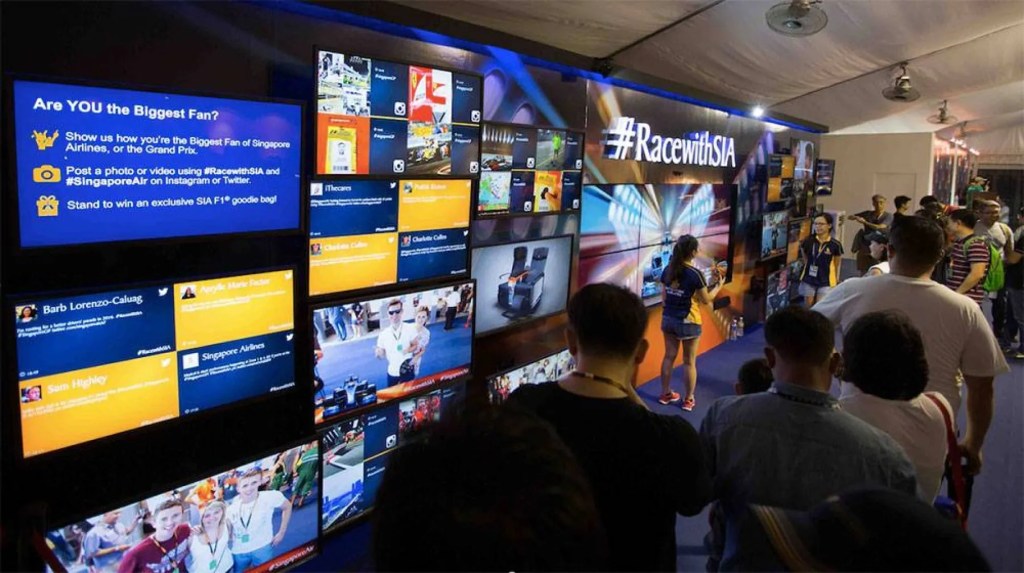
If you’d like inspiration, check out these curated testimonial wall examples that showcase how brands use interactivity to engage audiences
6. Mixed-Media Templates
Combine text, audio, and video snippets into one testimonial block. These creative testimonial templates let visitors engage in multiple ways.
Free Testimonial Templates & How to Use Them Effectively
Not every business has the budget to hire a designer for custom layouts. The good news? Plenty of free testimonial templates are available online through website builders, design tools, and open-source resources. The trick is knowing how to adapt them so they don’t look generic.
Where to Find Free Testimonial Templates
- Website Builders: WordPress, Wix, Shopify, and Squarespace often include built-in testimonial sections.
- Design Tools: Canva and Figma offer ready-to-use testimonial design templates you can customize with your brand fonts, colors, and images.
- Open-Source Libraries: Bootstrap and Tailwind CSS frameworks provide responsive testimonial components for developers.
Best Practices & Placement Tips for Testimonial Templates
Even the most polished testimonial design templates won’t deliver results if they’re hidden in the wrong place or formatted poorly. Placement and presentation are just as important as design.
1. Place Testimonials Near Key Conversion Points
Add testimonials next to calls-to-action (CTAs) like “Buy Now” or “Book a Demo.” A powerful review right before the decision moment helps push conversions.
2. Showcase Diversity in Testimonials
Don’t rely on a single glowing review. Use a mix of creative testimonial templates to highlight different industries, customer types, or use cases. This makes your product feel trustworthy for a wider audience.
3. Keep Layouts Mobile-Friendly
Over 70% of users browse on mobile, so make sure your testimonial templates are responsive. Test how they look in grid, carousel, or stacked formats on smaller screens.
4. Use Authentic Visuals
Whenever possible, add real customer photos, logos, or videos. Templates with faces or recognizable brands immediately boost credibility compared to plain text quotes.
5. Balance Design with Readability
A highly creative layout should never compromise clarity. Ensure font sizes are legible, colors are accessible, and testimonials don’t look “designed over.”
6. Refresh Regularly
Old testimonials can feel stale. Update your testimonial templates every quarter with new voices, case studies, or video snippets to keep trust signals current.
Final Thoughts
Testimonials aren’t just decoration—they’re one of the strongest forms of social proof your website can display. The right testimonial templates make reviews more than just text on a page; they transform them into persuasive, conversion-driving design elements. Whether you use creative testimonial templates to stand out, free testimonial templates to get started quickly, or custom layouts to match your brand identity, the key is simple: keep it authentic, clear, and strategically placed. Done right, testimonials don’t just earn trust—they turn browsers into loyal buyers.
Frequently Asked Questions (FAQ)
1. What are testimonial templates?
Testimonial templates are pre-designed layouts for displaying customer reviews and feedback on websites. They save time, look professional, and help highlight social proof effectively.
2. Where can I find free testimonial templates?
You can find free testimonial templates on website builders like WordPress, Wix, and Shopify, or design tools such as Canva and Figma. Developers can also use frameworks like Bootstrap or Tailwind CSS.
3. How do I make my testimonial design look professional?
Use authentic customer photos, consistent branding (fonts and colors), and keep layouts clean. Avoid overcrowding and always ensure readability on mobile.
4. Do testimonials really impact conversions?
Yes. Well-placed testimonials near CTAs or pricing sections can significantly increase trust and nudge visitors toward purchase decisions.
5. What is the best format for testimonials?
It depends on your goals. Card templates are great for product pages, carousel layouts save space on homepages, and video testimonials are best for building emotional trust.
6. Should I update testimonials regularly?
Absolutely. Refreshing testimonials every few months ensures your reviews stay relevant and reflect your most recent customer successes.





 Social Media Wall News
Leave a comment