In 2025, trust is everything online. People don’t just believe brand claims anymore—they want evidence. They want to see your real conversations, the updates you share, the culture behind your business, and how active your brand really is. That’s exactly why embedding a LinkedIn feed on your website has become one of the most powerful trust-building strategies for companies, agencies, startups, and personal brands.
LinkedIn is still the most credible professional network in the world. When you display your live LinkedIn posts, videos, articles, team achievements, and company news directly on your website, you instantly show visitors that your brand is active and transparent. Your website stops feeling static and starts looking like a real, evolving, human-driven brand.
This guide breaks down exactly how to embed a LinkedIn feed on your website in 2025—along with the benefits, examples, tools, SEO considerations, and optimization tips that matter.
Why Adding a LinkedIn Feed Matters in 2025
Embedding a LinkedIn feed is no longer just a design upgrade—it’s a conversion booster. When visitors land on your site and immediately see real content pulled directly from your LinkedIn profile or company page, their trust increases instantly.
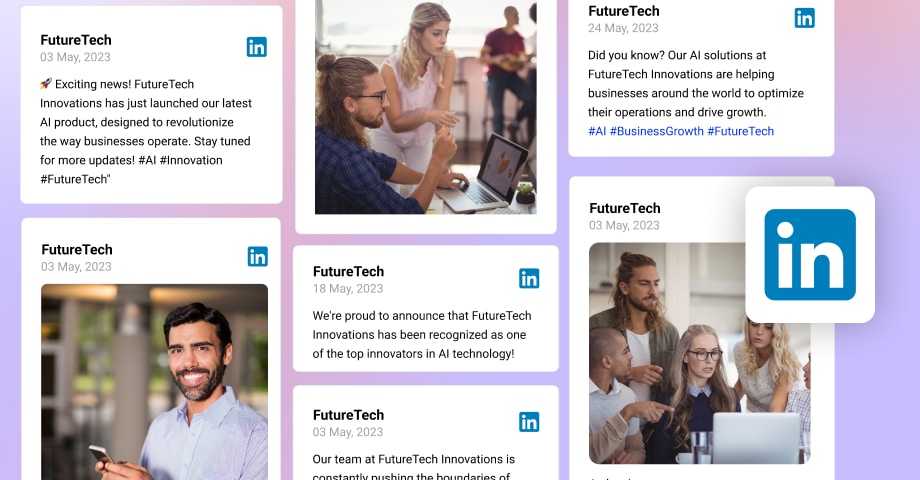
A LinkedIn feed may display things like:
- Recent posts in a modern grid or card layout
- Team updates, employee wins, and achievements
- Thought leadership articles or carousel posts
- Real culture moments and behind-the-scenes content
- Company news, hiring updates, or press mentions
All of this gives visitors a real glimpse of your brand’s activity and personality—without you manually updating your website every day.
Think of it as automatic authenticity.
Anyone can claim expertise. But when your website shows real-time LinkedIn content, your credibility becomes visible and verifiable.
What a LinkedIn Feed Actually Is (and How It Works)
A LinkedIn feed on your website is a live stream of posts automatically pulled from your LinkedIn profile or company page. Every time you post on LinkedIn, your website refreshes the feed.
This works through social media aggregation, where tools fetch your posts and display them in customizable widgets or embeds. You choose what appears, how it looks, and where it’s placed. It’s simple, automated, and completely flexible.
At its core, it’s social proof powered by real-time content.
How to Embed a LinkedIn Feed on Your Website (Complete 2025 Guide)
Since LinkedIn doesn’t offer a native continuous feed embed, the easiest method is using a third-party aggregator. Here’s the full process:
1. Pick a Social Media Aggregator Tool
Choose a tool that supports:
- Real-time LinkedIn updates
- API-secure integration
- Custom layouts
- Moderation controls
- Fast loading
- SEO-friendly embed structures
Many aggregators also support Instagram, Facebook, YouTube, or display social media feeds from multiple networks—useful if you ever want a combined feed.
2. Connect Your LinkedIn Account
Authenticate your profile or company page using OAuth. Once connected, the tool can fetch:
- Company updates
- Profile posts
- Articles
- Document posts
- Videos
- Event announcements
- Hashtag-based posts
- Employee advocacy content
You decide which sources to show on your site.
3. Choose What You Want to Display
Every brand uses LinkedIn differently, so curate your feed intentionally:
- SaaS companies may highlight product news or insights
- Agencies may show client wins and creative work
- Personal brands often highlight articles, speaking updates, or thought leadership
- Recruitment teams spotlight job posts and employee highlights
Your feed should reflect your brand voice—not just every post you’ve ever made.
4. Customize the Layout and Design
A feed that blends with your website design always performs better. Most tools offer:
- Grid layouts
- Masonry layouts
- Carousel sliders
- Sidebar widgets
- Full-width display blocks
Customize fonts, colors, spacing, and hover effects so the feed feels native to your website.
5. Moderate Your Feed
Not every post belongs on your site. Moderation tools let you:
- Hide specific posts
- Filter keywords
- Remove low-engagement content
- Enable AI-based moderation to auto-clean the feed
This keeps everything clean, professional, and on brand.
6. Get the Embed Code
After customization, the aggregator generates an iframe or JavaScript embed code. This is what you paste onto your website.
7. Embed the Code on Your Website
Placement is easy:
- WordPress: Custom HTML block
- Shopify: Custom section or embed block
- Webflow: Embed element
- Squarespace: Code block
- Custom site: Paste into your HTML template
Once it’s added, your LinkedIn feed appears instantly and updates automatically.
8. Test on All Devices
Check your feed on:
- Mobile
- Tablet
- Desktop
- Large screens
- All major browsers
A responsive feed improves user experience and boosts SEO metrics like dwell time.
Why Embedding a LinkedIn Feed Helps Your Website Perform Better
A LinkedIn feed isn’t just aesthetic—it has real measurable benefits:
1. Instant Trust
People believe what they see. Real posts = real activity.
2. Higher Dwell Time
Visitors scroll longer when they see fresh, dynamic content.
More dwell time = stronger SEO signals.
3. Better Conversions
Social proof eases hesitation and builds authority, especially for B2B or service brands.
4. Fresh Website Without Maintenance
Your site updates itself every time you post on LinkedIn.
5. Stronger Brand Storytelling
You showcase your voice, culture, and values naturally.
Practical Examples (LinkedIn Feed on Website Example)
Here’s how different brands use embedded LinkedIn feeds:
Corporate Website
Showcase leadership updates, press mentions, CSR activities, and announcements.
SaaS Platforms
Highlight product updates, webinars, feature releases, case studies, and customer stories.
Coaches & Personal Brands
Display articles, insights, speaking gigs, and community engagement.
Recruitment Agencies & HR Teams
Show new job openings, employee milestones, and employer-branding content.
These real examples show how flexible and powerful a LinkedIn feed can be when used properly.
Conclusion
Embedding a LinkedIn feed on your website in 2025 is one of the simplest ways to increase trust, strengthen your brand identity, and keep your site feeling fresh and alive—without extra work. With the right aggregator tool, you can integrate your posts, moderate your feed, customize the design, and show real proof of who you are and what your brand stands for.
Whether you’re trying to convert clients, build authority, impress employers, or simply make your website feel more human, a LinkedIn feed transforms your site into a dynamic, credible, and real-time reflection of your professional world.



 Social Media Wall News
Leave a comment